


Business process automation with AI means handing a repeatable, multi-step job to software that can read, sort and draft, with a person stepping in only at the points that need judgement, approval or customer contact. The place to start is one process that runs at least weekly, looks roughly the same each time, and ends somewhere a person can check in seconds. Not the hardest process. Not the most expensive one. The most boring one.
Most automation advice aimed at small business is either a list of tools or a warning about robots. Neither tells you which of your own processes to start with, which is the only question that matters in the first month. This article is about that question, and stops there.
One distinction is worth drawing early. Using AI for a task means asking it to draft an email or summarise a document, with you sitting there. Using AI for a process means the work moves from system to system without you, and AI handles the step in the middle that used to need a person. The first is a better keyboard. The second changes how many hours the job takes. Our guide to AI for small business covers the task side. This one covers the process side.
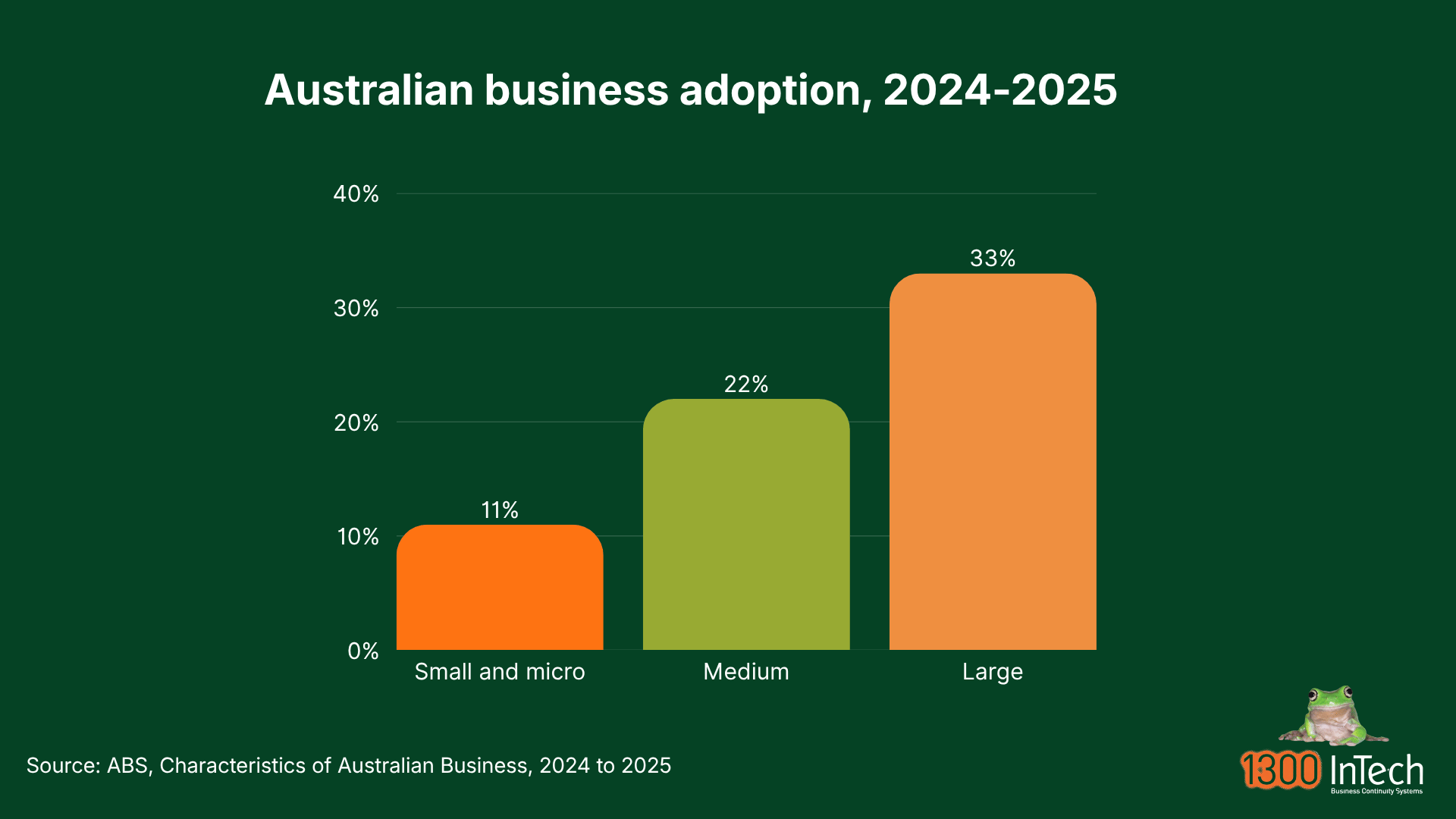
If you have not started, you are in the majority. The Australian Bureau of Statistics found 11% of small and micro businesses reported using AI in 2024-25, against 22% of medium businesses and 35% of large ones. Being late is not the risk here. Automating the wrong thing, quickly, is.
What is business process automation with AI?
In short: software runs the steps of a repeatable job from end to end, and an AI model handles the parts that need reading or judgement. A person still approves anything that matters.
Business process automation, often shortened to BPA, is not a new idea. A business process is a job with a beginning and an end that you do again and again. An enquiry arrives and becomes a quote. A supplier invoice arrives and becomes a payment. Each one is a chain of small steps, and in most small businesses a person carries the work along that chain by hand. Automation is the conveyor belt that moves the work without a person carrying it, and that part is not new either. Your accounting software has done it for years.
What is new is that AI can now do the steps that used to stop the belt. Reading a PDF nobody formatted for you. Working out which job a docket belongs to. Deciding whether an email is a complaint, an order or a supplier chasing payment. Those steps used to need eyes and a bit of judgement, so a person had to sit in the middle of an otherwise automatic process.
Put simply: automation is the conveyor belt, and AI is the pair of eyes you can now put on it. Business process automation with AI is both together, arranged around a job you already do.
What you get is narrower than the marketing suggests. Not intelligence: hours back, fewer keying errors, and knowing where work sits without having to ask someone. In most small businesses that shows up as capacity rather than a smaller wages bill.
How is it different from the automation you already have?
Rules-based automation does exactly what you tell it and stops when the input changes shape. AI automation copes with variation, but it can be confidently wrong, so it needs checking rather than trusting.
Most small businesses already run rules-based automation without calling it that: bank feed rules, recurring invoices, email filters, an out-of-hours diversion on the phones. Larger organisations call the industrial version robotic process automation, or RPA, but the principle is the same at any size. It is reliable, cheap and predictable. It also breaks the moment reality changes shape, because it cannot interpret anything.
|
|
Rules-based automation |
AI automation |
|
What it does |
Follows the exact steps you write |
Reads, classifies, extracts, drafts and summarises |
|
What breaks it |
Any input that does not match the rule |
Rarely stops, but can be wrong while looking right |
|
How it fails |
Loudly. Nothing happens |
Quietly. Something happens, and it is wrong |
|
What it costs to get wrong |
Usually a delay |
Potentially a wrong payment or a wrong answer to a customer |
The last two rows are the ones that matter. Rules-based automation fails safe, because you notice when nothing happens. AI automation fails quietly, because something plausible happens instead. That is not an argument against using it. It is the reason a person stays in the chain at the point where being wrong would cost you. In practice, the best small-business automations are still mostly rules with one AI step in the middle.
What does an automated process actually look like?
Six parts: a trigger, a fetch, an AI step, a checkpoint, an action and a log. If you can name all six for a process, you can automate it. If you cannot name the checkpoint, do not start.
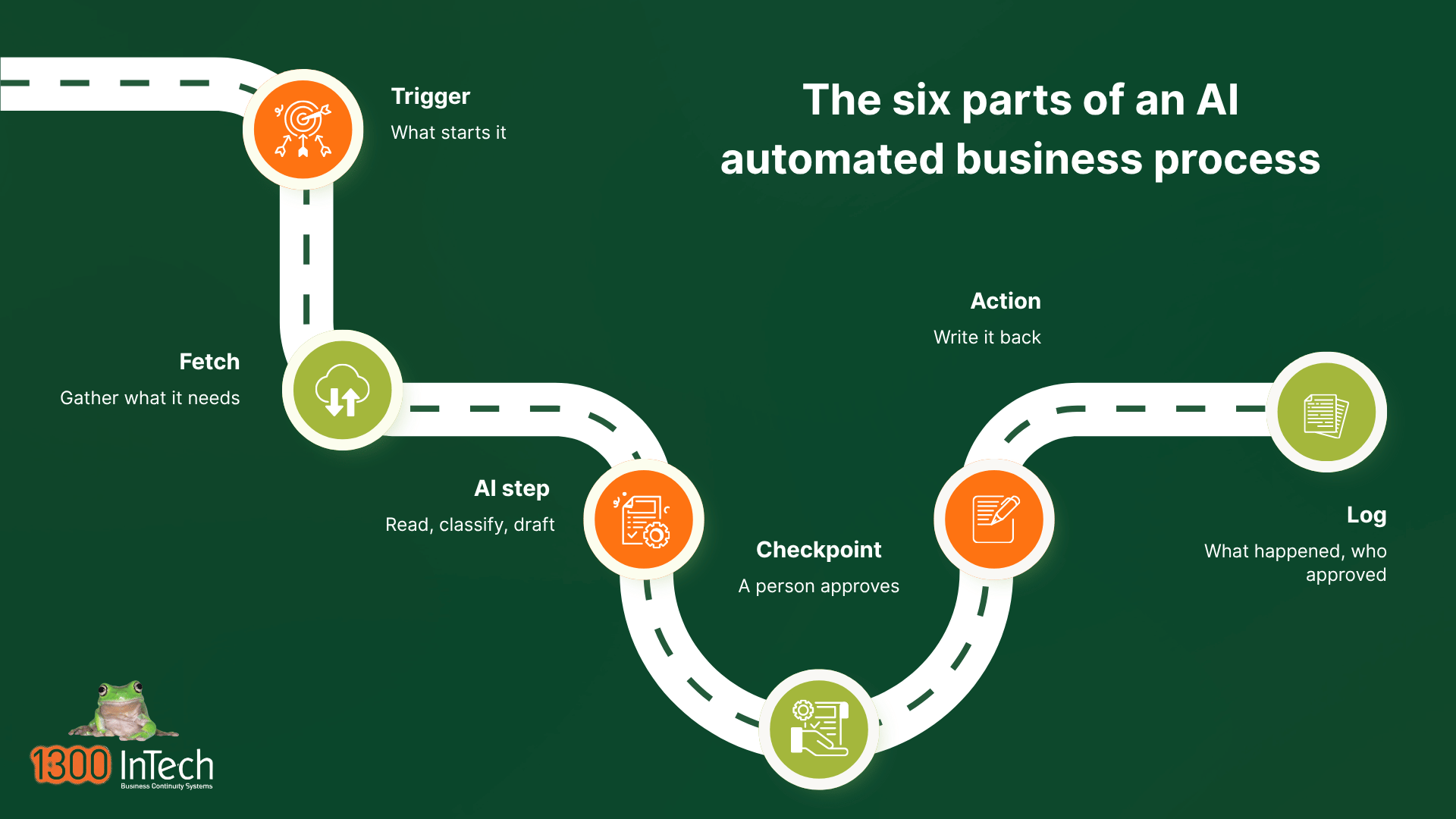
Every automated process has the same anatomy, whatever tool you build it in:
- Trigger. The thing that starts it. An email arriving in a monitored mailbox, a form submission, or a time of day.
- Fetch. The software gathers what it needs: the attachment, the customer record, the job number, the price list.
- AI step. The model reads, classifies, extracts or drafts. This is the natural language processing part, and the step a person used to do. It should have one job, not five.
- Checkpoint. A person sees the result and approves, edits or rejects it. This is the step most people skip, and it is the one that keeps you out of trouble.
- Action. The result is written back into a real system: a draft bill created, a record updated, an email queued.
- Log. What happened, what the AI produced, who approved it and when.
Two of these get left out most often, and they are the two that matter. Skip the checkpoint and you have built something that can be wrong at scale. Skip the log and you cannot tell whether it is working, which means you will never know when it stops.
Which processes should a small business automate first?
The best first candidates are high volume, low variety, low value per instance, and finish somewhere a person can check quickly. Back-office work usually beats anything customer-facing.
Score a process on four questions before you look at a single tool:
- How often does it run? Weekly is the floor, daily is better. Rare work gives you nothing to test against and no payback.
- How much does it vary? If every instance is a special case, it is not a process, it is a series of decisions.
- What is one instance worth? Low value per instance means a mistake is cheap. Save the expensive processes until you trust the pattern.
- Can someone tell in seconds whether it is right? If verifying the output takes as long as doing the work, you have moved the effort, not removed it.
Processes that usually score well in a small business:
|
Process |
Why it works |
What to watch |
|
Supplier invoices into accounting |
High volume, same shape, easy to verify against a purchase order or job |
Never let it change a bank account or release a payment |
|
Enquiry triage and first-response drafting |
Every enquiry is text, and speed of reply is worth real money |
A person sends the reply, always |
|
Quote follow-up |
Predictable timing, and the work is remembering, not deciding |
Keep pricing out of it. Follow up, do not renegotiate |
|
Staff onboarding and offboarding |
A fixed checklist across several systems, and forgetting a step is a security problem |
Access removal on exit needs proof, not an assumption |
|
Timesheet to payroll preparation |
Repetitive, deadline driven, and errors are visible |
A person approves before anything is paid |
|
The monthly reporting pack |
Same numbers, same shape, every month |
Someone who knows the numbers reads it before it circulates |
Three of those fail in specific ways that are worth knowing before you start:
- Enquiry triage. A complaint dressed up politely gets classified as a routine question, and a cheerful draft reply makes it worse. Route anything containing words like refund, cancel or lawyer straight to a person, with no draft attached.
- Onboarding and offboarding. Most of it is rules rather than AI, and automating the offboarding half is how businesses discover which systems they actually run, including the supplier portal one person set up years ago.
- The monthly reporting pack. AI describes what changed well and diagnoses why badly, because the reason usually sits outside the data. It will call a revenue dip seasonal when the real cause was a customer leaving.
What to leave alone for now
Some processes are poor first candidates, not because the technology cannot touch them, but because being wrong is expensive and hard to reverse:
- Anything that releases a payment or changes bank details.
- Setting or sending prices without a person approving them.
- Screening or ranking job applicants, or anything that affects someone’s employment.
- Terminating a customer’s service, or answering a complaint or a dispute.
These are the processes where a quiet error becomes a real problem, and several of them attract obligations of their own. That does not mean AI cannot help with them at all. It means a person still presses the button.
How do I decide what the machine does and what I keep?
Split the steps of the process into three columns: machine unsupervised, machine then a human approves, and human always. Do this on paper before you build anything.
This is the part of the work most people skip, and it is worth more than the tool comparison. Take the process, write out every step, and put each step in one of three columns.
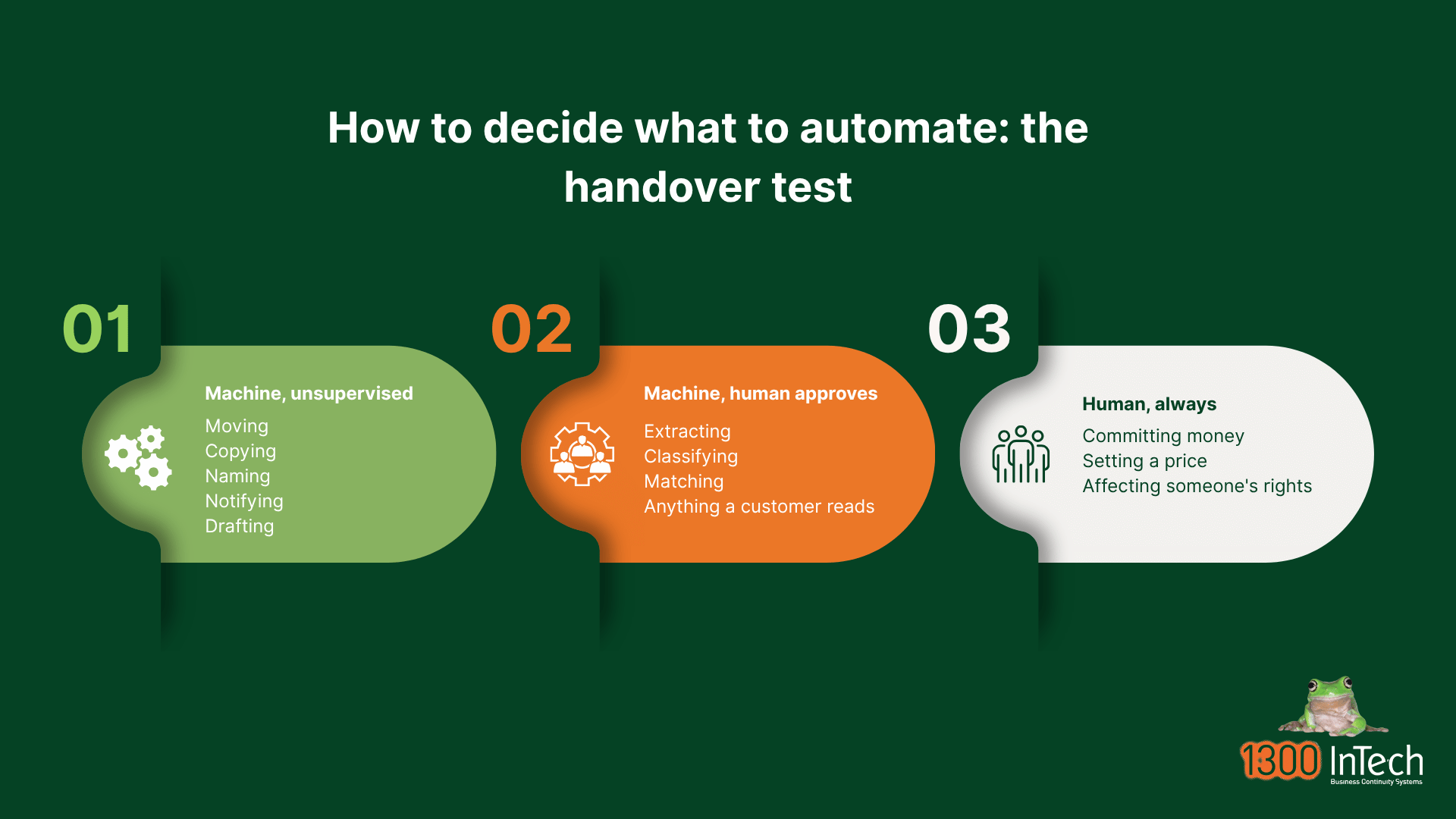
|
Column |
What belongs there |
The test |
|
Machine, unsupervised |
Moving, copying, naming, notifying, creating drafts, gathering information |
If this is wrong, is it cheap and quick to undo? |
|
Machine, human approves |
Extracting figures, classifying, matching records, drafting anything a customer will read |
Can a person check it in seconds and see an error? |
|
Human, always |
Committing money, setting a price, making a promise, anything affecting a person’s rights |
Would you be comfortable explaining this decision if it went wrong? |
Most failed automations are not built badly. They are built with a step in the wrong column. That is also the practical meaning of maintain human control, one of the six essential practices in the National AI Centre’s Guidance for AI Adoption, and it sounds like a slogan until you have to decide, step by step, exactly where the human sits.
One more rule, learned the hard way: the person in the approval column has to have time to do it properly. An approval queue that one person clears in bulk on a Friday afternoon is not a control. It is a formality with your name on it.
A worked example: supplier invoices
Illustrative only. This is not a real customer case study.
A Melbourne commercial plumbing contractor with 22 staff receives roughly 120 supplier invoices a month, almost all as PDFs attached to emails, in about fifteen different layouts. The bookkeeper opens each one, keys the figures into the accounting system, matches it to a job, and files the PDF. It takes most of a day a week.
It scores well on all four questions. It runs daily. Every invoice is a different layout but the same information. A mistake on one invoice is cheap if it is caught. And anyone can tell in seconds whether the supplier, total and job number are right. Now draw the line:
|
Step |
Column |
Why |
|
Detect the invoice email and save the PDF |
Machine, unsupervised |
Pure filing. A misfiled PDF costs a minute |
|
Read the supplier, invoice number, date, total and GST |
Machine, human approves |
This is the AI step, and the numbers must be right |
|
Match it to a job or purchase order |
Machine, human approves |
Usually obvious, occasionally ambiguous |
|
Create a draft bill in the accounting system |
Machine, unsupervised |
A draft commits nothing |
|
Approve and pay the bill |
Human, always |
Where money starts moving, and where invoice fraud lives |
|
Record what was extracted and who approved it |
Machine, unsupervised |
The audit trail |
Before switching anything on, the bookkeeper times the current job for a fortnight and counts how many invoices had a keying error last quarter. Those two numbers, hours and errors, are the whole measurement plan. Then they run the automation alongside the manual process for two weeks, checking every extraction, rather than replacing anything.
That parallel run is what tells you whether the model reads your fifteen invoice layouts or only twelve of them. If it handles twelve, the answer is not to abandon it. It is to route the other three to a person and automate the twelve. At six weeks they measure the same two numbers again and decide, and that decision date, agreed in advance, is what separates a trial from a subscription nobody cancels.
Should you automate anything yet?
Sometimes the honest answer is not yet, and that is a decision rather than falling behind.
Automation pays off when the same work happens often enough that shaving minutes adds up. A business doing twelve invoices a month does not have an invoice problem. It has twenty minutes of work. Building an automation around it costs more than it saves, and leaves you something else to maintain.
There are three situations where the money is better spent elsewhere first. If two people do the same job differently and nobody agrees which is correct, fix that before automating either version. If the data going in is a mess, with three versions of the same supplier, automation will produce wrong output faster. And if the delay in your process is one person approving everything, the constraint is the approval rule, not the software.
That last one is the most common and the most expensive to get wrong. Quotes that take four days because the owner checks every one do not get faster when you automate the drafting. They get faster when the owner stops checking the routine ones.
What can go wrong?
Five failure modes account for most of the damage, and the checkpoint and the log you were going to skip prevent most of them.
- It is confidently wrong. An AI step does not stop when it is unsure. It produces something plausible. ASD’s Australian Cyber Security Centre calls this a hallucination and names it as one of the three risks in its guide, Artificial intelligence for small business. A total read from the wrong line of an invoice looks exactly like a correct one, which is why the approval column exists.
- A small error repeats 400 times. This is what separates automation from a mistake at a desk. A person who misreads one invoice misreads one invoice. A process that misreads one field misreads it every time until someone notices.
- It drifts. It works for months, then a supplier changes their invoice template and accuracy quietly falls. Nothing announces it, which is what the log is for. Review any process with an AI step in it on a schedule, rather than when someone complains.
- Your data trains someone else’s model. Some providers use customer-submitted data to improve their models, and whether they do can depend on your configuration or your subscription tier. Find out before you connect anything to your accounting system or your mailbox. It is often a setting, or the difference between a free and a paid plan.
- It gets used to commit fraud. Business email compromise was the most reported cybercrime category in ASD’s Annual Cyber Threat Report 2024-25. Any process that touches supplier payments is a target, so a change of bank account details must always be verified by a person, by phone, on a number you already had.
The pattern behind all five is the same. Automation does not create new kinds of mistakes. It removes the person who used to notice the old ones.
What do the rules expect of you?
As at September 2026 there is no AI-specific law that applies to a small business automating a process. Your existing privacy, consumer and workplace obligations apply unchanged.
Australia’s National AI Plan of December 2025 confirmed the approach of relying on existing laws rather than a standalone AI Act. That position is now moving: the Prime Minister announced a framework of Australian Standards for AI on 15 July 2026, with an Office of AI inside the Department of the Prime Minister and Cabinet and legislation expected in early 2027, and a Joint Select Committee on Artificial Intelligence reports by 30 November 2026. None of it changes what a small business must do today, because the announced standards are aimed at data centres and AI infrastructure rather than at businesses using AI tools. Worth rereading once the Committee reports.
The National AI Centre’s Guidance for AI Adoption, published in October 2025 and updated in May 2026, sets out six essential practices. Its Foundations version is written for organisations early in their adoption, which describes most small businesses. For a business automating one process, each practice is smaller than it sounds.
|
Practice |
What it means for one automated process |
|
Decide who is accountable |
Name the person responsible for this process. One name, not a team |
|
Understand impacts and plan accordingly |
Write down what the process does and what happens if it is wrong |
|
Measure and manage risks |
Decide which steps sit in which of the three columns above |
|
Share essential information |
Tell the staff who use it, and customers where it affects them |
|
Test and monitor |
Run it in parallel before you trust it, then review it on a schedule |
|
Maintain human control |
Keep a person at the point where being wrong would cost you |
One date is worth diarising. From 10 December 2026, businesses covered by the Australian Privacy Principles must say so in their privacy policy if they use a computer program to make decisions with personal information that could significantly affect a person’s rights or interests. If your automation drafts things a person reads, edits and sends, that probably does not catch you. If it screens, scores or ranks people, quite possibly, and that is worth a conversation with a qualified adviser rather than a guess.
Budget in four parts: the AI licence, the automation platform, the build, and someone to own it. The licences are the small part, and the ownership is the part businesses forget.
Pricing moves often enough that any figure printed here would be stale before long, so this is the shape of the bill rather than a quote. Verify current pricing with the vendor.
AI assistant licences are charged per user per month, in the range of a phone plan, and are usually an add-on to a subscription you already pay for. The automation platform is charged per user or per flow, and the connector you need is often the one on the higher tier. Usage charges, per action or per document, look cheap in a pilot and are the line that surprises people at volume. The build is a one-off, whether that is a project cost or your own time.
The fourth part is the one everybody leaves out: someone has to own it. Write down what the process does, what it connects to and how to turn it off, and make sure a second person knows. An automation built by the one person who understood it, who has since left, is a liability rather than an asset. The same goes for the platform: before you commit, ask what happens to your flows and your data if you stop paying, because an automation you cannot export is a process you no longer own.
The software is rarely what makes an automation expensive. A first process built on tools you already licence can cost very little. What costs money is discovering halfway through that nobody had ever written the process down. That is a reason to pick a small process first, not a reason to avoid it.
Your first 30 days
Four weeks, one process, no purchase in the first fortnight. If you cannot describe the process on one page in week one, you have picked the wrong process.
|
Week |
What you do |
What you have at the end |
|
Week 1 |
List the repeatable processes in the business. Score each on frequency, variation, value per instance and how quickly the output can be checked |
A shortlist of three, and one chosen |
|
Week 2 |
Write the chosen process out step by step. Put every step in one of the three columns. Time the current process and count its errors |
A one-page map, and the two baseline numbers |
|
Week 3 |
Find out what your existing subscriptions already include, then choose tools that fit the map. Check data handling, whether your inputs train the vendor’s model, and whether it can write results back into the system you already use. Build the smallest version that does one thing |
A working draft, running on real examples |
|
Week 4 |
Run it in parallel with the manual process. Check every output. Route what it cannot handle to a person |
Evidence, and a decision date in the diary |
Notice that nothing is bought until week three, and nothing is switched off until after week four. The two weeks of thinking are what make the two weeks of building short. Set the decision date when you switch it on, not when you get around to it, and be willing to stop. Automation that half works and nobody trusts is worse than the manual process it replaced, because you now pay for both.
Where to start
Pick the most boring process in the business. The one people sigh about. Write it down step by step, decide where the human stays, and measure it for a fortnight before you change anything.
Keep the first version small enough to explain in a sentence. Route the exceptions to a person rather than trying to make the model handle everything, because the last 10% of cases usually costs more than the first 90%.
Prove it on one process, then take what you learned to the next. And if the process touches customer data, payments or systems you cannot afford to break, get advice before you connect anything. That is the sort of review we do with clients as part of Managed IT and IT consulting, before rather than after.

Related reading:
- AI for small business. The task-level guide: the three uses that pay off fastest, and how to adopt AI safely.
- What are Managed IT services? What ongoing management of your technology covers, and what sits outside the monthly fee.
- Digital business transformation for Australian small business. Where process automation fits in the bigger picture.
What is business process automation with AI?
It is the use of software to run a repeatable, multi-step job from beginning to end, with an AI model handling the steps that need reading or judgement, such as extracting figures from an emailed invoice. A person still approves any step that commits money or reaches a customer.
Is AI automation the same as using ChatGPT?
No. Using an AI assistant is a task you sit and do, and it helps one person work faster. AI automation runs a process without you, using AI only for the step that used to need a person. The difference is whether you are in the chair.
What can a small business realistically automate with AI?
The usual first candidates are supplier invoices into the accounting system, triaging enquiries and drafting first responses, quote follow-up, onboarding and offboarding checklists, timesheet preparation, and the monthly reporting pack. All are high volume, low variety and easy to check.
What should a small business not automate?
Anything that releases a payment, changes bank details, sets a price without approval, screens job applicants, terminates a customer’s service, or answers a complaint. Being wrong in those processes is expensive and hard to reverse, so a person presses the button.
Do I already have the tools to automate a process?
Possibly. Microsoft 365 and Google Workspace both include automation tools on most business plans, and many accounting and job management systems have workflow rules or document capture built in. Ask whoever manages your Microsoft 365 what your plan already covers before you buy an automation platform.
How much does AI automation cost for a small business?
Budget in four parts: AI licences, an automation platform, the one-off build, and someone’s ongoing time to own it. Licences are usually the smallest part and are often an add-on to software you already pay for. The cost people underestimate is ownership.
Do I need a developer to automate a process with AI?
Not usually for a first process. Mainstream automation platforms are built for people who are not developers, and much of the work is deciding what the process does rather than building it. You will want help when it crosses several systems or touches personal or financial data.


Alan Arthurson is the Managing Director of 1300 INTECH and has worked in Melbourne's computing industry since 1970, from IBM mainframes to today's AI platforms. A member of the Australian Computer Society since 1984, he helps Australian small and mid-sized businesses run reliable, secure and well managed IT.
This article provides general information only and does not take account of your particular circumstances. Privacy, security and employment obligations vary by business. Seek advice suited to your situation.